Use It Anywhere: One Memory, Every AI Tool
Your owned vault is portable by design — here's how to load it into any assistant, and the one rule that makes it work.
There’s a simple test for whether you own something or only rent it: can you take it with you when you leave?
By that test, most people’s “AI memory” isn’t theirs. It lives inside one tool — you switch on the memory feature, feed it your context, and it’s locked in that vendor’s box. Change tools and you start from nothing. Leave, or the tool quietly retires the feature, and it’s gone. That’s renting.
New here? This is Part 3. Start with Edition 1 — The Foundation (the structure) and Edition 2 — Fill the Vault (filling it). This piece is what you do with it once it’s yours.
The whole reason to build the vault the way those two editions describe — plain markdown, in folders you own, no platform underneath — is that it passes the test. You can take it anywhere. And “anywhere” is pleasantly literal: every AI tool can read it, today, with no special infrastructure. Here’s how, from the crudest method to the most automatic — and the one rule that makes all of them work.
Load the slice, not the whole thing
Start with the rule, because it governs everything below. You don’t hand a tool your entire vault. You hand it the slice that’s relevant — the client you’re working on, the project you’re in, the trip you’re planning. The reason your knowledge lives in scoped folders instead of one giant file is precisely so you can do this: pick up the corner that matters and leave the rest behind. Your whole life in every chat is noise; the right corner is signal. Every method below is really “load the slice, by this mechanism.”
It helps that the vault is plain markdown. Every model reads it cleanly — headings, lists, links — with no conversion and no surprises. (It’s the same bet behind TripKit, the little trip-planner I open-sourced: a plain file any AI can pick up and run with. Own the format, and portability comes free.)
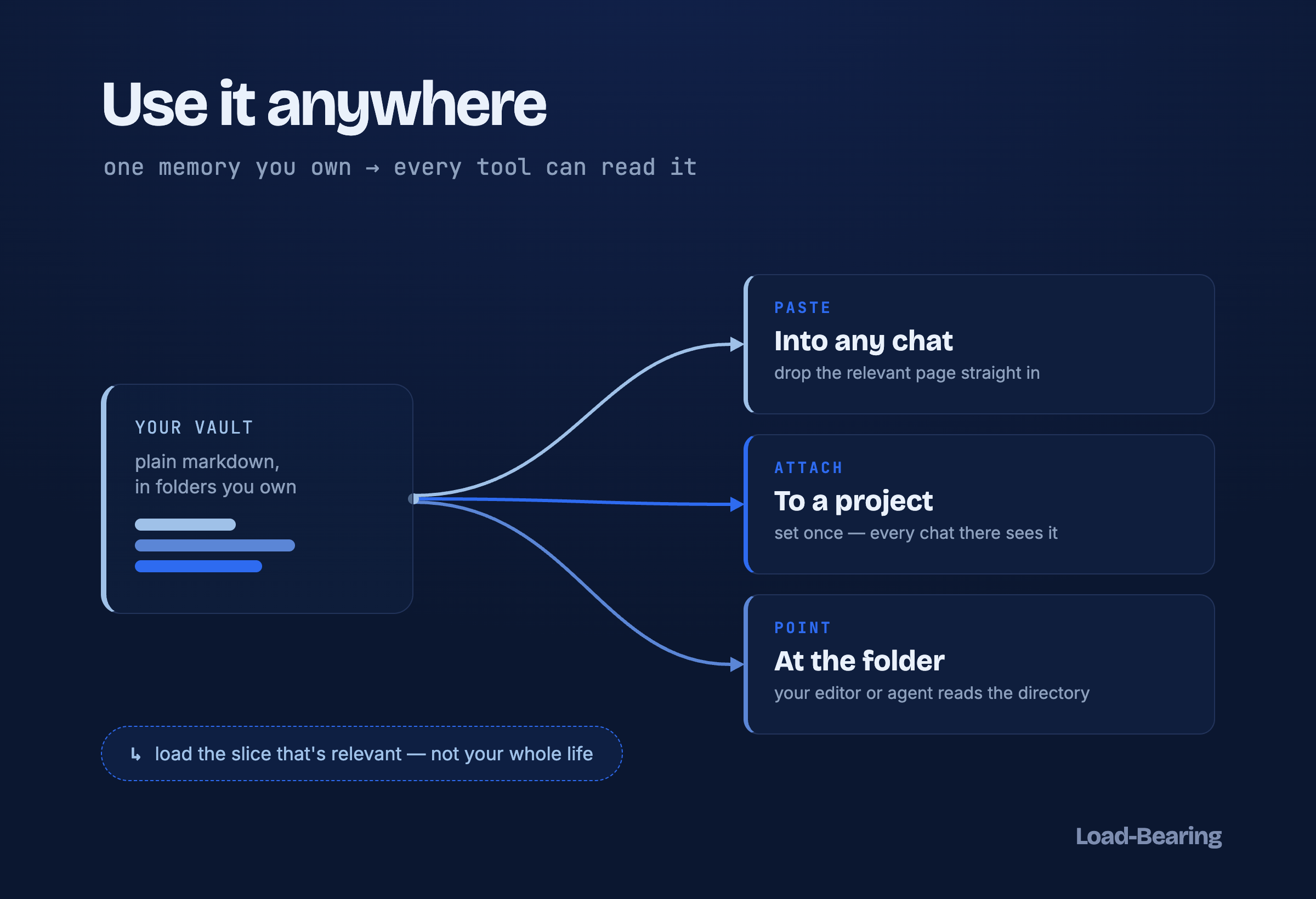
Three ways to hand your vault to any tool — and the one rule under all of them: load the slice that’s relevant, not your whole life.
Method 1 — Paste it
The crudest and most universal: copy the relevant page into the chat. It works in every tool that exists, needs zero setup, and is the right move for a one-off question where a single page is enough context.
One small trick makes it land better: prefix it with a line that tells the tool how to treat the text — “Use the context below as background; don’t summarize it back to me, just draw on it.” Otherwise some assistants will dutifully recap your own notes at you.
Method 2 — Attach it to a project (set it once)
This is the one I reach for most, because you do it once and then forget about it. Most assistants now have a project — a workspace that keeps files available across every chat inside it. Make one for the thing you’re actually working on, add the two or three vault pages that matter, and from then on every conversation in that project already has the context. No pasting, no re-explaining. When something changes, you fix the one page and every future chat has the update.
The menus differ, but the pattern is identical everywhere:
- ChatGPT — Projects (add files), or a Custom GPT with the pages as Knowledge.
- Claude — Projects → Project knowledge.
- Gemini — Gems with the pages as knowledge, or Drive-connected files.
- Editor assistants (Copilot, Cursor, and the like) — the open workspace is the project; the files are simply there.
Method 3 — Point a tool at the folder
The most automatic, for coding and agent work where the tool can already see your filesystem. No pasting at all: aim it at the vault (or one folder of it) and @-mention the pages you want — it reads the directory directly. This is where an owned, plain-text vault really pays off: there’s nothing to export or sync, because the files are already on disk where the tool is looking.
What travels well — and what to trim
Travels well: markdown; current-state pages (where something stands now); short decision records; one concern per file, so you can hand over exactly the slice you need.
Trim before you send: raw chat-log history (load the compiled page, not the transcript it came from); anything stale (fix the page’s current state first); and — always — secrets. API keys, tokens, and account numbers should never have been in a vault page in the first place; double-check before pasting into any tool you don’t fully control.
Where this leaves you (and where it goes next)
If what you wanted was a second brain that follows you between tools, you have it now. Your context lives in files you own; you load the relevant slice into whatever you’re using; you never start from zero again. That’s a complete, useful thing, and plenty of people can happily stop right here.
But if, doing this, you start to feel the friction — I’m pasting and pointing and re-loading by hand, across two machines, a dozen times a day — hold onto that feeling. It’s the exact seam where a filing system starts wanting to become something that does the loading for you. That’s the deep end of this series, and it’s where the next stretch of editions goes.
First, though, somewhere more human. Next edition: I gave my family its own corner of the vault — meals, travel, the kids’ school — and the one thing that makes it safe to keep right next to everything else. That one’s for everybody.
The free resource
I condensed all of this — the three methods, where each lives in each assistant, what to trim — into a one-page cheat-sheet you can keep beside you. Subscribe and reply “send it” to this edition, or grab it from the library next to the structure kit and the loader.